I was sitting at my desk one Tuesday evening in January, six weeks after buying my Noise ColorFit Pro and looking at the Noise Health app and I was genuinely confused.
The watch had been doing everything it said it would. It tracked my steps, logged my sleep, and kept an eye on my heart rate through every meeting and meal. The data was all there, laid out in colorful graphs. And yet nothing had changed about how I really felt. I was still tired at 3 PM. Still not sleeping well. Sitting at my desk for hours without moving. Still eating badly when work got stressful.
The watch was in good working order. I wasn’t.
That realization took me longer to reach than I would like to admit. I had expected the smartwatch to improve my health automatically, as if the act of measuring something would somehow change it. It took me weeks to understand that a smartwatch is not a health intervention. It is a mirror. What you do with what the mirror shows you is entirely your responsibility.
If you are reading this because your own smartwatch is sitting on your wrist but your health has not shifted the way you hoped, you are in exactly the right place. This article covers what smartwatches genuinely do, the six specific reasons they fail to improve health for most people, and the practical changes I made that finally made mine useful.
No hype. No unrealistic promises. Just honest, practical information from someone who made every mistake in the book first.
Why So Many People Feel Let Down by Their Smartwatch
The disappointment is predictable when you understand how smartwatches are marketed versus how they actually function.
Every advertisement shows active people effortlessly tracking their fitness, hitting goals, and living their best lives. The implicit message is that the device produces the healthy lifestyle. Buy the watch. Get the results.
The reality is different. A smartwatch is a sensor-based data collection tool. It notices patterns in your movement, heart rate, and sleep and presents them in a readable format. That is genuinely useful. But it requires you to interpret that data and then change your behavior based on what you find. The watch observes. You decide. You act.
Most people skip the middle step entirely. They look at the numbers, feel some combination of motivation and guilt, and then carry on with the same habits that produced those numbers. The data loops without producing change.
There is also the issue of mismatched expectations around accuracy. Consumer smartwatches are wellness tools, not medical devices. Their readings are estimates produced by algorithms, not clinical measurements. Step counts, calorie burns, sleep stages, and even heart rate during activity all carry meaningful margins of error. When people treat these estimates as precise facts and make health decisions based on them, they build on a foundation that is shakier than it appears.
How This Affects Your Daily Life
The practical impact of a misused smartwatch goes beyond just not getting healthier. It actively adds stress to daily life in ways that most people do not recognize until they stop and think about it.
Checking your health metrics multiple times a day creates a monitoring loop that keeps your attention on numbers rather than on actual behaviors. It shifts focus from how your body feels to what the screen says. Over time, this can reduce body awareness rather than increasing it.
The constant availability of health data also creates what researchers call the measurement-behavior gap. You feel you are doing something about your health because you are watching your numbers. But watching is not the same as changing. The sense of engagement without actual behavioral change is one of the more subtle ways smartwatches can undermine the health goals they are supposed to support.
| Smartwatch Experience | Common Result |
|---|---|
| Checking stats constantly | Anxiety, not awareness |
| Treating estimates as facts | Misleading health decisions |
| Setting unrealistic targets | Daily feeling of failure |
| Ignoring stand reminders | No actual movement increase |
| Notifications on all night | Sleep disruption while measuring sleep |
| Data without behavior change | Same health outcomes, more stress |
Why Is Your Smartwatch Not Improving Your Health?
The most direct answer is this: a smartwatch does not improve health on its own. It improves health only when you use its data to make consistent behavioral changes. Most people do not make that connection reliably, and without it, the device stays decorative.
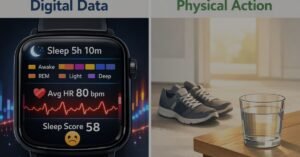
Here is what I found in my own experience and from reading how wearable technology actually functions.
Reason 1: You Are Looking at the Data but Not Acting on It
This was the biggest thing I got wrong, and I see it in almost everyone who tells me their watch is not helping them.
The watch generates data all day. Looking at that data feels productive. The reality is that reading your step count and feeling vaguely disappointed is not the same as walking more. I spent weeks reviewing my sleep score every morning, noting that it was lower than I wanted, and then doing nothing differently that evening. The watch was accurate. I was just not listening.
The shift that changed things for me was simple. After checking my stats, I started asking one question: what is one specific thing I can adjust today based on what this shows? Not a general resolution. A specific behavior. That question is where the actual value of wearable data lives.
Reason 2: You Are Treating Estimates Like Medical Results
When I first saw my resting heart rate trending higher than the ranges I had read about online, I worried. I checked it more frequently. I cross-referenced it with articles. I started wondering if something was wrong.
What I did not understand was that the optical heart rate sensor in a consumer smartwatch produces an estimate based on how light reflects off the blood in your wrist. That estimate is affected by how tightly the watch sits, how warm your skin is, whether you just had caffeine, and many other normal daily factors.
Research published in npj Digital Medicine has found that while consumer smartwatches can offer reasonable resting heart rate estimates in calm conditions, accuracy during activity and across different skin tones varies considerably between devices. Using these readings as if they are laboratory results leads to conclusions that the data cannot reliably support.
Trend data over weeks is genuinely useful. A single reading at 2 PM on a stressful Tuesday is not meaningful medical information.
Reason 3: Checking Too Often Was Making Me More Anxious, Not Healthier
At my worst, I was checking my heart rate around twenty times a day. I told myself this was being health-conscious. The Cleveland Clinic describes health anxiety as excessive preoccupation with physical symptoms, often based on misreading normal body signals. That description fit what I was doing accurately.
Every slight spike in my heart rate after climbing stairs, after a stressful email, or after a strong coffee became something to examine and worry about. The device I had bought to reduce health stress was actively generating it.
Checking stats once in the morning and once in the evening gives you genuine awareness of trends. Checking every thirty minutes without medical knowledge to interpret what you are seeing just produces a cycle of low-grade worry that adds stress rather than reducing it.
Reason 4: My Watch Was Disrupting the Very Sleep It Was Measuring
This one still makes me shake my head. I had set my watch to pass through every notification from my phone. Emails arriving at midnight. News alerts at 2 AM. Messages at 6 AM before my alarm. All of them vibrating on my wrist while I was supposed to be in deep sleep.
My sleep scores were low partly because my notification settings were waking me up repeatedly. I was measuring disrupted sleep while simultaneously causing the disruption. Enabling do-not-disturb from 10 PM to 7 AM was a fifteen-minute setup task that improved my sleep scores within the first week because the watch finally stopped interrupting the sleep it was supposed to track.
Reason 5: My Goals Were Set for Someone Else’s Life, Not Mine
When I set up my watch, I immediately selected ten thousand steps as my daily target. My actual baseline was around three thousand steps on most days. So for the first month, I failed every single day by seven thousand steps.
The ten thousand steps target, as I later found out, does not come from clinical research. It originated from a Japanese pedometer marketing campaign in the 1960s. More recent research suggests that meaningful cardiovascular and mortality benefits appear at step counts well below ten thousand and that the most important factor is consistent improvement from your personal starting point, not reaching any specific absolute number.
When I reset my target to four thousand steps, something shifted. I started hitting it. Then I moved to five thousand. The consistency I built from realistic targets produced more actual movement than a month of feeling like a failure at an unrealistic one.
Reason 6: The Watch Had Not Changed Anything Outside the App
Here is the honest truth that sits beneath all the other reasons. A smartwatch records what happens during the twenty-three hours you are not actively reviewing the app. What you eat, when you sleep, how often you move, and how you handle stress during those hours determines your health outcomes far more than the data on your screen.
I had been so focused on watching the numbers that I had stopped working on the behaviors those numbers were supposed to reflect. The watch measures your habits. It does not build them for you. Building the habits that the watch can track is the actual work. Our guide on daily habits for better health covers exactly that kind of foundation.
What Actually Helped: Practical Changes That Made a Difference
These are the specific shifts that moved my smartwatch from a stress source to a genuinely useful part of my routine.
Strategy 1: Focus on One Metric for Four Weeks
I stopped trying to improve steps, sleep, heart rate, and stress simultaneously and picked one number to focus on per month. First month: sleep duration only. I asked one question each week: Did I average more sleep this week than last week?
This works because attention is a limited resource. Spreading it across five metrics dilutes the behavioral focus needed to improve any of them. Narrow focus produces visible progress, and visible progress keeps you going.
Strategy 2: Switch to Weekly Reviews
I moved from checking my watch throughout the day to reviewing weekly summaries every Sunday morning. One bad day of sleep or a low step count tells me almost nothing useful. A week of data shows patterns I can actually respond to.
During that weekly review, I ask two questions: what changed in my routine this week that might explain the numbers, and what is one specific adjustment I want to make next week? That is the whole process. It takes ten minutes.
Strategy 3: Connect Each Pattern to One Specific Behavior
When I noticed that my sleep scores dropped on evenings when I ate dinner after 9 PM, I did not make a vague resolution to sleep better. I made one concrete change: finishing my main meal by 8 PM on weekdays.
Specific observations connected to specific behavioral changes are where wearable data actually improves health. Vague intentions connected to data patterns do not. The more precise the connection between what the data shows and what you decide to do, the more useful the device becomes.
Strategy 4: Actually Respond to Stand Reminders
For months, my watch sent a stand reminder every hour and I glanced at it and kept working. When I started genuinely standing up and walking to another room for two minutes each time the reminder appeared, my daily step count increased by several hundred steps without any deliberate exercise. The watch had been doing its job the whole time. I had been dismissing its most practically useful feature.
Strategy 5: Configure Sleep Mode Before You Need It
This setup takes fifteen minutes and is probably the single highest-impact change most smartwatch users can make tonight. Schedule do-not-disturb to cover your entire sleep window. Disable the always-on display during those hours. Remove vibration from all non-essential notifications.
The watch that was waking you up to measure your sleep will stop doing that. Your sleep will improve. Your sleep scores will reflect actual rest rather than interrupted light sleep. For broader evening habits that support good sleep, our smart living evening routine guide covers the full picture.
Strategy 6: Wear It Correctly and Keep It Clean
The heart rate sensor requires consistent contact with your skin to work properly. Wearing the watch one finger-width above the wrist bone, snug enough that it does not shift during movement but not so tight it leaves marks, produces noticeably more consistent readings than a loosely worn watch.
Cleaning the back of the watch and the inner surface of the band a few times per week with a slightly damp cloth removes the accumulated sweat and skin residue that can affect sensor performance and cause skin irritation.
Strategy 7: Use the Data to Start Conversations, Not Conclusions
If your smartwatch shows something that concerns you, the right response is to mention it to a healthcare professional, not to spend more time analyzing the app. The watch can flag patterns worth discussing. It cannot tell you what those patterns mean medically. Treating it as a starting point for professional conversations rather than a source of medical conclusions is a more accurate and less anxious way to use it.
How Smartwatch Use Compares: Common vs. Effective Approach
| Aspect | Common Approach | Effective Approach |
|---|---|---|
| Checking frequency | Throughout the day | Once morning, once evening |
| Data interpretation | Moment-to-moment readings | Weekly trend patterns |
| Step target | 10,000 from day one | Baseline plus small increment |
| Stand reminders | Acknowledged and ignored | Actually followed every time |
| Notifications at night | All enabled | Do-not-disturb fully scheduled |
| Sleep mode | Not configured | Set up for full sleep window |
| Response to concerns | More app analysis | Conversation with healthcare provider |
| Focus | Multiple metrics at once | One metric per month |
Realistic Benefits When Used the Right Way
When the approach changes, the outcomes change. Here is what research and experience suggest is realistic with consistent, correct use over time.
| What May Improve | Realistic Timeframe |
|---|---|
| Daily step count increase | 2 to 4 weeks of consistent realistic targeting |
| Sleep duration awareness | Immediate data, behavioral shift in 3 to 6 weeks |
| Reduced sedentary time | 1 to 3 weeks with genuine reminder compliance |
| Resting heart rate trend | 6 to 12 weeks of increased consistent daily activity |
| Reduced monitoring anxiety | 2 to 4 weeks of less frequent checking |
These timelines are approximations. Individual responses vary based on starting habits, lifestyle context, and how consistently the behavioral changes are maintained. The watch supports these changes. It does not create them.
Who Gets the Most Value From a Smartwatch
People rebuilding activity after long sedentary periods benefit most from the step counter and stand reminder combination. The visible number creates gentle daily accountability that is particularly useful for people whose work keeps them desk-bound for most of the day. Starting with a realistic target just above the current baseline and building gradually produces better long-term results than ambitious initial targets.
People working to understand their sleep patterns can use wearable data to identify which specific evening behaviors correlate with better or worse nights. The watch will not diagnose a sleep problem, but it can help you notice that your sleep consistently suffers after certain habits. For a more detailed look at how reliable smartwatch sleep data actually is, our article on are smart health gadgets really accurate covers the accuracy question thoroughly.
Desk-based professionals who spend long stretches sitting without moving benefit specifically from hourly movement reminders. Brief standing breaks throughout a workday are associated with meaningful cardiovascular and metabolic benefits, and a watch that prompts this behavior addresses one of the most consistent health risks of modern office work.
Beginners who want a low-effort entry into health awareness find wearable technology useful as a starting point as long as expectations are realistic from the beginning. The device provides a baseline, which is genuinely valuable information for someone who has never tracked their activity or sleep before.
Common Mistakes to Avoid
Skipping the initial setup. Many people put the watch on without entering accurate profile information or selecting the correct wrist. Step and calorie estimates during that period use generic default values that may be significantly wrong for your body. Spending twenty minutes on proper initial setup is the foundation for getting trend data you can actually trust.
Wearing it too loose. I wore mine like a loose bracelet for weeks. Optical heart rate sensors require stable contact with skin. A watch that shifts during movement produces inconsistent readings. Snug but comfortable, with the sensor sitting against the skin rather than floating above it, is the correct fit.
Ignoring software updates. Updates regularly include algorithm improvements that increase tracking accuracy. Declining them habitually means the watch is running older, less accurate calculations than it is capable of. Updating when prompted takes a few minutes and often meaningfully improves data quality.
Using third-party health apps without checking their privacy practices. Some apps that connect to smartwatch data share health information with advertising partners or store it with limited security. Sticking to the manufacturer’s official app and established health applications reduces this risk significantly.
Expecting the watch to replace medical care. If a symptom or pattern genuinely concerns you, the appropriate response is speaking with a qualified healthcare professional, not spending more time in the app. The watch provides observations. A doctor provides interpretation and guidance.
Quick Wins You Can Start Today
Configure sleep mode on your watch tonight before you go to bed. Open the settings, schedule do-not-disturb to cover your full sleep window, and disable the always-on display during those hours. This single change costs nothing and removes the most common way smartwatches actively interfere with the sleep they are measuring.
Reset your step target to your actual current baseline plus five hundred steps. Open the app right now, check what your real average daily step count has been over the past two weeks, and set your new target just above that number. Stop measuring yourself against a goal that was never based on your starting point.
Frequently Asked Questions
Why is my smartwatch not improving my health?
A smartwatch improves health only when its data leads to consistent behavioral changes. The device collects and presents information, but moving more, sleeping better, and managing stress are actions that happen independently of the device. Data without behavioral response produces no health change regardless of how accurately it is collected.
Are smartwatch heart rate readings accurate?
Consumer smartwatch heart rate readings are reasonable estimates during rest for most users, but accuracy decreases during exercise and varies based on fit, skin tone, movement type, and device quality. They work best as trend indicators over time rather than precise moment-to-moment measurements for medical use.
Can wearing a smartwatch make health anxiety worse?
Yes, for some people. Checking health metrics very frequently without context for interpreting normal fluctuation can contribute to excessive worry about minor changes. If reviewing your watch data increases stress rather than reducing it, limiting checks to once or twice daily is a practical and effective adjustment.
What is the 10,000 steps goal based on?
The ten thousand steps target came from a Japanese pedometer marketing campaign in the 1960s, not clinical research. More recent research suggests meaningful health benefits begin at step counts well below ten thousand, and that consistent improvement from your personal baseline matters more than reaching any fixed absolute number.
Is it safe to wear a smartwatch while sleeping?
For most people, yes. The key is configuring do-not-disturb and sleep mode to cover your full sleep window. Without this, the device may vibrate with notifications throughout the night, disrupting the sleep it is simultaneously measuring.
Can a smartwatch detect heart conditions?
Some advanced models include ECG features that can detect certain irregular rhythms in controlled conditions. However, consumer smartwatches are not regulated as medical devices and are not approved for diagnosing heart conditions. Any alert or pattern that concerns you should be followed up with a healthcare professional using clinical equipment.
Why does my calorie count from the smartwatch seem wrong?
Calorie estimates from wearables are based on movement data and your entered profile details. Research consistently finds these estimates carry significant margins of error, particularly during non-walking activities. Using smartwatch calorie data for precise dietary decisions is not recommended because the accuracy does not support that level of precision.
How often should I check my smartwatch statistics?
Once in the morning and once in the evening is sufficient for most people. This gives you trend awareness without the compulsive monitoring pattern that develops when you check throughout the day and start reacting to normal moment-to-moment fluctuations.
Is a smartwatch useful if I do not exercise at all?
Yes. The device tracks everyday movement, including walking around the home, doing household tasks, and commuting. For someone largely sedentary, stand reminders and step tracking can provide the gentle, consistent nudge that gradually increases daily activity even without structured exercise.
How do I protect my health data from smartwatch apps?
Use the official app from your device manufacturer. Set a strong unique password for your health account. Review app permissions and remove access to anything the app does not actually need. Avoid syncing sensitive health data on public Wi-Fi networks.
Should I wear my smartwatch every single day?
Consistency improves the quality of trend data. More complete daily records allow the app to identify patterns more accurately. That said, occasional breaks do not meaningfully undermine long-term usefulness, and giving your skin a brief rest each day is reasonable for comfort.
Can a smartwatch tell me if I have a sleep disorder?
No. Consumer smartwatches can show patterns in sleep duration and general sleep stages, but they are not clinically validated for diagnosing sleep disorders. If you consistently feel unrefreshed despite adequate sleep hours, that is worth discussing with a healthcare professional rather than analyzing further in an app.
Conclusion
I still wear my smartwatch every single day. But the relationship I have with it now looks nothing like those first frustrated weeks.
I check it twice a day. I look at weekly trends rather than daily numbers. I have one behavioral goal at a time connected to what the data shows, and I focus on that before thinking about anything else the watch tracks.
The device did not change. My understanding of what it is actually for changed, and that made all the difference.
A smartwatch is not a health transformation. It is a mirror that shows you patterns in your own behavior. What you do with what that mirror shows you is entirely your choice. But when you approach it with accurate expectations and use it to make one small specific change at a time, it becomes genuinely worth wearing.
Start with one metric tonight. Set one realistic goal. Make one specific adjustment this week. That is how a gadget on your wrist becomes a real health companion over time.
This article is for educational purposes only and does not provide medical advice. Please consult a qualified healthcare professional for personalized guidance.